

Friday, September 14, 2018
Tip: ExcelDataReader returns "Invalid File Signature" when reading an Excel file.
Just happen to notice this problem when i am trying to load multiple Excel files from the same directory. The root cause for such error is simple for me, whenever I populate the file names using the "Directory.EnumerateFiles", it returns the Excel temporary file also, which the file name always start with a "~". So this file actually is not a valid Excel file, that's the reason when "AsDataset" function is called, it always throw error when the codes tried to load that extra file.
 So the solution for me is to always exclude file names that start with a "~".


Wednesday, July 4, 2018
Tip: OpenCV 4.0 Library Files Inclusion
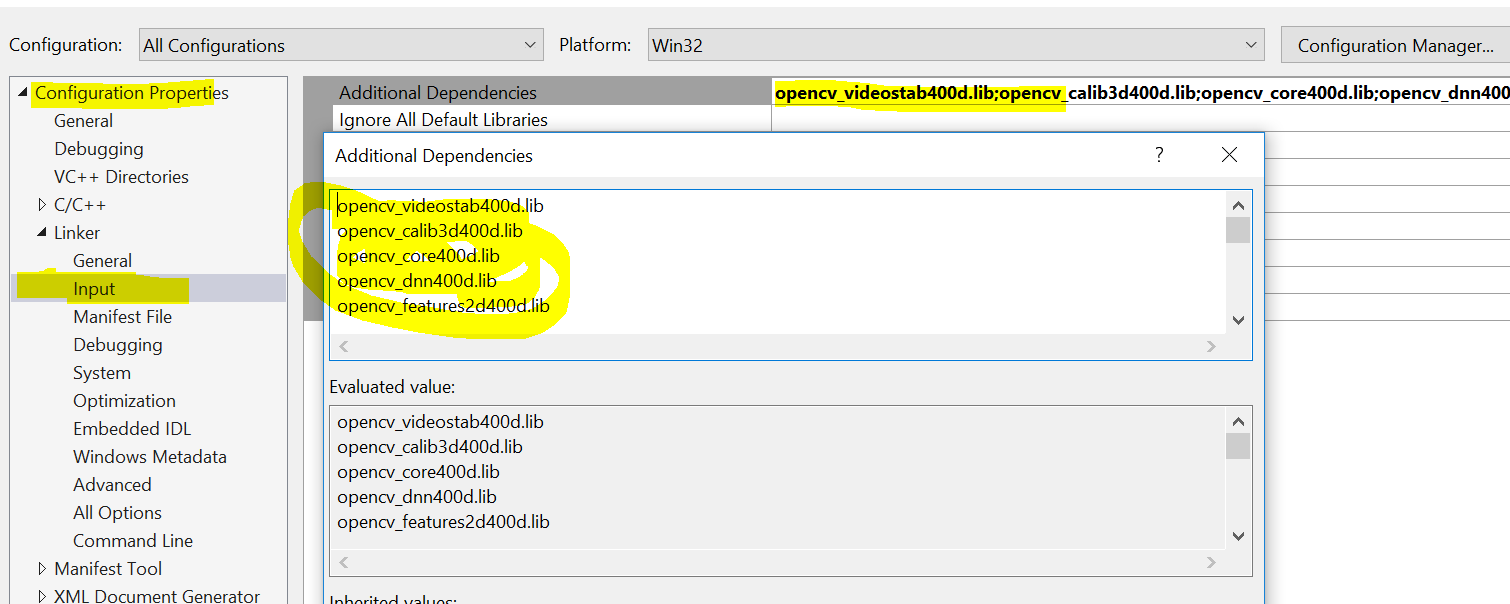 |
| C++ Configuration in Visual Studio 2017 |
opencv_videostab400d.lib
opencv_calib3d400d.lib
opencv_core400d.lib
opencv_dnn400d.lib
opencv_features2d400d.lib
opencv_flann400d.lib
opencv_highgui400d.lib
opencv_imgcodecs400d.lib
opencv_imgproc400d.lib
opencv_ml400d.lib
opencv_objdetect400d.lib
opencv_photo400d.lib
opencv_shape400d.lib
opencv_stitching400d.lib
opencv_superres400d.lib
opencv_ts400d.lib
opencv_video400d.lib
opencv_videoio400d.lib
Tuesday, June 5, 2018
Tip: How to properly setup the EmguCV/OpenCV OCR in Visual Studio.
Running the OpenCV OCR against an image requires setup that reads the related language file from a pre-defined directory in your machine. Usually if you did not specify any path, it will look from the application path if you are building an exe file. Below is a sample code that reads an image and write the text to the console.
I am using EmguCV 3.4.1 for the testing. In Visual Studio, you have to include the reference to the .NET wrapper dll Emgu.CV.World dll.
 You need to create a new folder with the name "tessdata" inside your running application folder, for example the "debug" folder. In this folder you have to put in the language file which you can download from Language Files.. In this case i downloaded the "eng.traineddata" because the picture that i wants to read is in English language.
After you compile the application, you should be able to see something like this:
You need to create a new folder with the name "tessdata" inside your running application folder, for example the "debug" folder. In this folder you have to put in the language file which you can download from Language Files.. In this case i downloaded the "eng.traineddata" because the picture that i wants to read is in English language.
After you compile the application, you should be able to see something like this:

using System;
using System.IO;
using Emgu.CV;
using Emgu.CV.OCR;
using Emgu.CV.Structure;

namespace ConsoleOCR
{
    internal class Program
    {
        private static void Main(string[] args)
        {
            using (var image = new Image<Bgr, byte>(Path.GetFullPath("testImage.png")))
            {
                using (var tesseractOcrProvider = new Tesseract(@"", "eng", OcrEngineMode.Default)) //point to TESSDATA_PREFIX env variable.
                {
                    tesseractOcrProvider.SetImage(image);
                    tesseractOcrProvider.Recognize();
                    var text = tesseractOcrProvider.GetBoxText().TrimEnd();
                    Console.WriteLine(text);
                }
            }
        }
    }
}
 You need to create a new folder with the name "tessdata" inside your running application folder, for example the "debug" folder. In this folder you have to put in the language file which you can download from Language Files.. In this case i downloaded the "eng.traineddata" because the picture that i wants to read is in English language.
After you compile the application, you should be able to see something like this:
You need to create a new folder with the name "tessdata" inside your running application folder, for example the "debug" folder. In this folder you have to put in the language file which you can download from Language Files.. In this case i downloaded the "eng.traineddata" because the picture that i wants to read is in English language.
After you compile the application, you should be able to see something like this:
Monday, June 26, 2017
Tip: Docker unable to copy bin\Debug folder to the target image.
Recently I have been playing with the Docker whereby i was trying to copy my simple Visual Studio project exe from bin\Debug to the target image location. My Docker file looks like this:
A successful run.
FROM microsoft/nanoserver
WORKDIR c:/
RUN DIR
COPY /bin/Debug/ /ConsoleApp2/
RUN DIR C:\ConsoleApp2
CMD ["C:\\ConsoleApp2\\ConsoleApp2.exe","",""]
However when i executed the command docker build -t consoleapp2:dev . an error showed up: GetFileAttributesEx bin\\Debug\: The system cannot find the path specified. saying that the folder could not be found when actually the folder was there. So I digged into the .dockerignore file that accompanies the Dockerfile when I added it through Visual Studio. Inside the file there's a bunch of patterns that filter out related files or directories, so i removed everything from that file and run the Docker build command, the next thing you know it was a successful run.
* (Culprit)
!obj\Docker\publish\*
!obj\Docker\empty\
Only obj folder get copied over.
A successful run.
Sending build context to Docker daemon 123.9 kB
Step 1/6 : FROM microsoft/nanoserver
 ---> 4a8212a9c691
Step 2/6 : WORKDIR c:/
 ---> Using cache
 ---> ebcfa5b95aa7
Step 3/6 : RUN DIR
 ---> Using cache
 ---> 6dfa39dc1b7b
Step 4/6 : COPY /bin/Debug/ /ConsoleApp2/
 ---> fb65c840b3eb
Removing intermediate container 8eb904bad33a
Tuesday, February 21, 2017
Tip: Mixing SSRS Report in a MVC Application
It's very common for us to reuse whatever that's already available in a software project. This is true when we want to reuse a set of reports which are designed and developed using the SSRS report designer and we want to use it in a MVC web site. The problem with this is that MVC does not support the SSRS report viewer directly like a web form web site. There are 2 options to solve this issue:
1. Use an iframe from within the MVC view to load the web form which resides on the same domain.
2. Use an ifram from within the MVC view to load the web form which resides on a different sub-domain.
As you can see the only difference between the 2 options is to use a different sub domain to host the web forms. This sounds like non-significant difference but it does make a big difference when comes to report loading performance.
The first option for some reasons which i have not found out yet, will most probably unable to load some of my reports. The report viewer constantly use up the CPU for a long time without delivering any result.
As for option 2 the report viewer does use a lot of CPU too, but it is able to load reports that are not "loadable" in option 1.
Monday, October 27, 2014
Tip: Dynamically updating workflow service
Recently I have come across the need to create a tool to update workflow service dynamically using the .NET FW 4.5 new Dynamic Update feature. I have spent few days looking into how I can do it with Workflow Service. However, it turned out to be a failure because the method I used is only suitable for app host type of workflow. At the edge of disappointment, I found this useful web sample provided by the Microsoft sample web site. It's a tutorial on how I can do side-by-side versioning and dynamic update to a workflow service. It's a perfect example showing how we can insert the update map into the workflow service (which is something different from the console app host method) and finally show how we can update running instances of the workflow service using the scarcely documented API WorkflowUpdateableControlClient.
WF4.5 Developer Preview - C# Expression, Workflow Versioning and Dynamic Update
Wednesday, May 14, 2014
Tip: Bootstrap 3.1.1 "dropdown-submenu" Workaround
The new bootstrap navbar does not support more than 2 levels of menu. That is to say the "dropdown-submenu" css class has been removed since Bootstrap 3.0. In order to work around that issue one can add the missing piece into another css file.
Menu HTML Notice how the css class "dropdown-submenu" is used in the HTML snippet.Menu CSS
Notice how the CSS is put in place. In certain scenario for example when we use a centered navbar, the "!important" command is important to override the Bootstrap original behavior for the third level menu to appear correctly.
Subscribe to:
Posts (Atom)