I came across this term "gRPC " when talking to a CTO from UK. I heard of RPC but not "gRPC", so i did a quick search on Google and found out that it works similarly to Microsoft WCF, just that it supports different programming languages ranging from C++, C#, Ruby, Python, etc and it's developed by Google. WCF supports only .NET languages. To find out more here's a link https://stackoverflow.com/questions/35694273/whats-the-difference-between-grpc-and-wcf
One more thing that i would like to mention about WCF is, there's a community in the.NET Foundation that has started the effort to create an open source WCF (Currently WCF Client in development, but not the WCF core itself) targeting for .NET Core programming model. However it's still at a very infant stage and probably not ready for production use out of the box, unless user development team is willing to take on the extra effort to customize the codes and fix any new issues discovered.
The link to the WCF .NET Foundation https://www.dotnetfoundation.org/blog/2015/05/20/wcf-is-open-source
In ASP.NET Core, Visual Studio uses the Protobuf compiler to compile the proto code into C# code.
gRPC Web UI - https://github.com/uw-labs/bloomrpc which ease the testing for the gRPC service contract.

Friday, January 17, 2020


Friday, December 20, 2019
Tip: Using matplotlib from Python in Visual C++
Recently when playing with OpenCV, I realized that I need to have a library that can display images with the scale that i can set. After some searching, I found that I can make use of the matplotlib library from Python in my C++ program. After further searching, I found that I can borrow the C++ library that call to the Python matplotlib library from the following GitHub Matplotlib
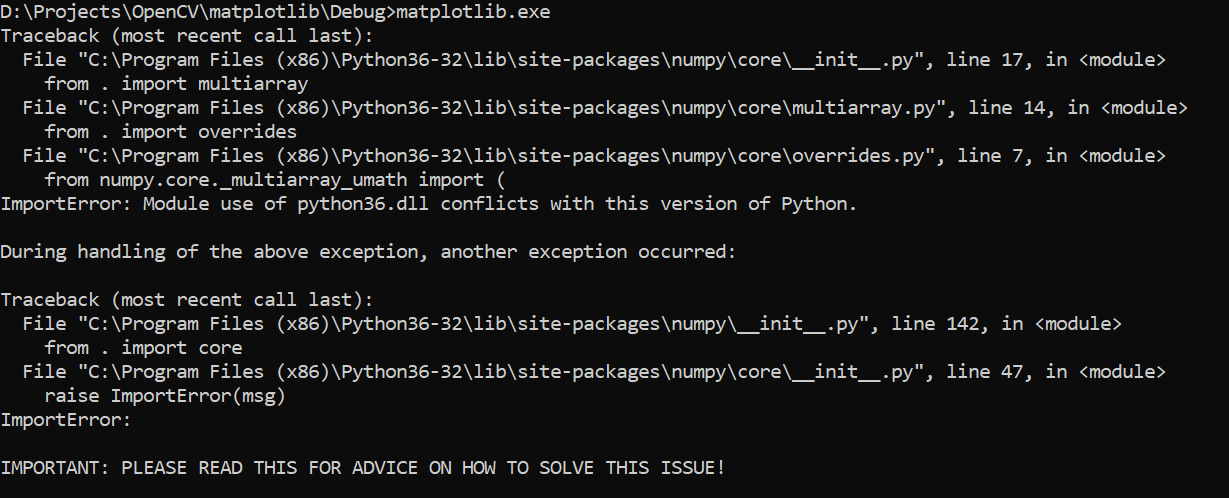
How the C++ library can make use of the Python matplotlib package is by using the Python compiled library (Python36.lib) and referencing the Python.h header file, which I got it from the Python installation path at C:\Program Files (x86)\Python3.6.3\libs. If the file you are an invalid lib file or dll file, most probably you will see the following error.
 In order to get rid of this error, I built the application with 32-bit release version of python library.
I have to ensure that I have matplotlib installed for Python. Note that I have multiple versions of the Python installed in my PC and I need to install the matplotlib package just for Python3.6.3 because I am going to use that Python version in my C++ project. I used the following command to install the matplotlib package just for Python 3.6.3
C:\Program Files (x86)\Python3.6.3>python -m pip install matplotlib.
Basically I CD the Python installation path so that when i call the Python command it will call to the 3.6.3 version, as my default Python installation at that time was 3.7.3, which is not what i want to use in my C++ project.
The full source code for the release can be retrieved from GitHub https://github.com/leonwooster/matplotlib
How the C++ library can make use of the Python matplotlib package is by using the Python compiled library (Python36.lib) and referencing the Python.h header file, which I got it from the Python installation path at C:\Program Files (x86)\Python3.6.3\libs. If the file you are an invalid lib file or dll file, most probably you will see the following error.
I have to ensure that I have matplotlib installed for Python. Note that I have multiple versions of the Python installed in my PC and I need to install the matplotlib package just for Python3.6.3 because I am going to use that Python version in my C++ project. I used the following command to install the matplotlib package just for Python 3.6.3
C:\Program Files (x86)\Python3.6.3>python -m pip install matplotlib.
Basically I CD the Python installation path so that when i call the Python command it will call to the 3.6.3 version, as my default Python installation at that time was 3.7.3, which is not what i want to use in my C++ project.
Note: If you are using python.exe, that means the numpy and matplotlib packages need to be compatible with the "Release" version. If you are using python_d.exe then you need to ensure numpy and matplotlib is compatible with the "Debug" version. For debug version you can use C:\Program Files (x86)\Python3.6.3>python_d.exe -m pip install matplotlib to do correct package installation. Typical error one will get when the version is not compatible is ImportError: cannot import name 'multiarray'A good guideline for using debug version of the Python with release version of matplotlib from within Visual C++ Numpy issue
The full source code for the release can be retrieved from GitHub https://github.com/leonwooster/matplotlib
Sunday, October 20, 2019
Tip: Web API vs WCF - High Level
Location Concern
Within the company Network and .NET based clients : Use WCF with TCP binding (Fast communication than HTTP)
Outside the company Network, and use diverse technologies like PHP, Python, web UI etc: Use Web API with REST
Security Concern
WCF support WS- standard and SOAP protocal.
Web API is tighly coupled with http, so can only use http releated security measures.
Network languages
WCF support multiple protocols like SOAP, TCP, HTTP, HTTPS, Named Pipe, MSMQ,
Web API supports only http, https
Architecture
WCF can be used to build SOA compliance services due to the nature that it's able to support different protocols.
Web API is mainly used for front end integration, e.g. Web UI because of http protocol.
Message Format
WCF supports more message formats than web api, e.g. binary message formats
Web api supports text based message format e.g. JSON, XML
Speed
WCF offers faster speed than web api when the service and client sits in the same server. We can use tcp protocol to achieve fast message transfer.
Within the company Network and .NET based clients : Use WCF with TCP binding (Fast communication than HTTP)
Outside the company Network, and use diverse technologies like PHP, Python, web UI etc: Use Web API with REST
Security Concern
WCF support WS- standard and SOAP protocal.
Web API is tighly coupled with http, so can only use http releated security measures.
Network languages
WCF support multiple protocols like SOAP, TCP, HTTP, HTTPS, Named Pipe, MSMQ,
Web API supports only http, https
Architecture
WCF can be used to build SOA compliance services due to the nature that it's able to support different protocols.
Web API is mainly used for front end integration, e.g. Web UI because of http protocol.
Message Format
WCF supports more message formats than web api, e.g. binary message formats
Web api supports text based message format e.g. JSON, XML
Speed
WCF offers faster speed than web api when the service and client sits in the same server. We can use tcp protocol to achieve fast message transfer.
Wednesday, October 9, 2019
Tip: How to add form data as a parameter(s) into Swagger UI
Recently I come across the need to pass form data from an Angular form to a web API written in ASP.NET MVC. The web
api
does not accept any input parameter specifically via the function signature. However i need to access some form
values
via the HttpContext.Current.Request.Form. Unfortunately the form does not provide any text box to enter the
necessary
payload.
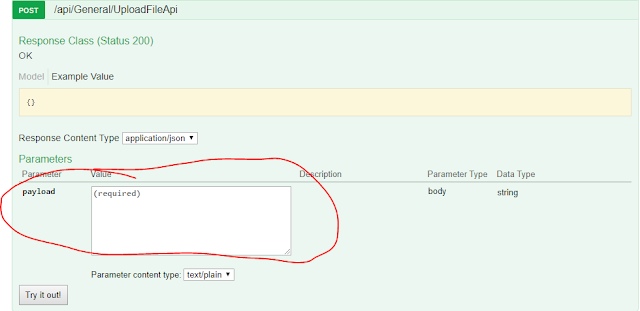
After doing some research I found out how to make Swagger to show an extra text box just for that particular web api. First of all I need to define a function attribute that i can use for the web api, and also to tell Swagger that the function actually consist of extra parameters that need to shown in the UI. The code looks like the following:
The next piece of the code shows how we can register the attribute filter to the Swagger. The code tells Swagger to go through every Controller class in the project and check for the specified filter and in turn inform the Swagger UI about any extra parameters to create.
As you can see during application startup, the Swagger will trigger this code via the following configuration in SwaggerConfig.cs file.
The following code shows how the attributed is applied:
After doing some research I found out how to make Swagger to show an extra text box just for that particular web api. First of all I need to define a function attribute that i can use for the web api, and also to tell Swagger that the function actually consist of extra parameters that need to shown in the UI. The code looks like the following:
The next piece of the code shows how we can register the attribute filter to the Swagger. The code tells Swagger to go through every Controller class in the project and check for the specified filter and in turn inform the Swagger UI about any extra parameters to create.
As you can see during application startup, the Swagger will trigger this code via the following configuration in SwaggerConfig.cs file.
The following code shows how the attributed is applied:
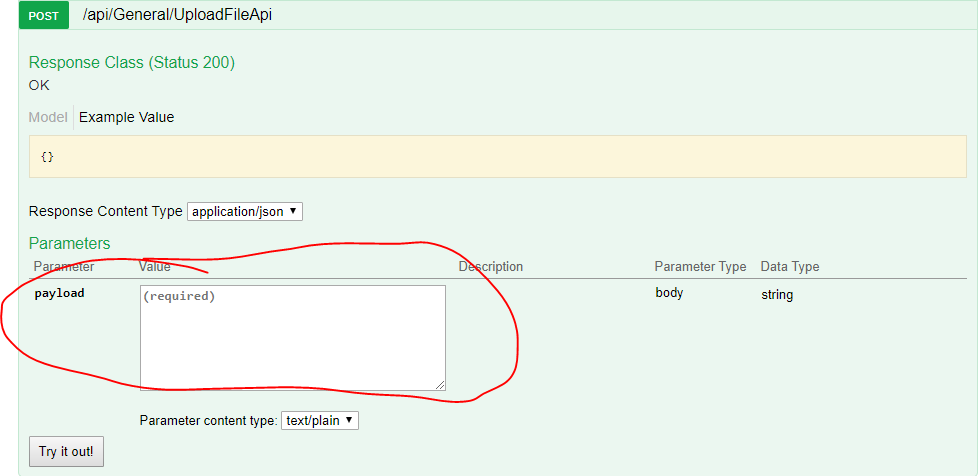
The picture below shows the end result in Swagger UI:
Thursday, September 26, 2019
Tip: SharePoint 365 CSOM Nuget Package
Which on to use for SharePoint Online, when you want to use CSOM to connect to it?

 The reason for this post is to let people know that whenever you someone try to execute some operations to SharePoint Online and receive the following error, when your codes seem to be correct:
NOT To Use

To Use

Microsoft.SharePoint.Client.CollectionNotInitializedException HResult=0x80131509 Message=The collection has not been initialized. It has not been requested or the request has not been executed. It may need to be explicitly requested. Source=Microsoft.SharePoint.Client.RuntimeThe are two reasons for such scenario:
- Try to access some properties within the CSOM object namespace but did not execute the proper "Load" and "ExecuteQuery" functions.
- Used the wrong library version. As indicated above the package shown in first picture is for SharePoint2010 whereas the second picture is for SharePoint Online.
Thursday, September 12, 2019
Tip: How to kill the WebHelper sub-processes from BitTorrent
It's annoying when you found out that some unidentified processes are hogging a lot of CPU resources while running BitTorrent to download some files. Since i know how to do programming, i've created a console application that constantly monitoring the process list for WebHelper sub processes and kill them when found. As you can see from the picture below, the program checks the process list every minute.
 The simple application which makes use of C# and Windows Form can be retrieved from Git Hub.

Tip: How to get the internal name for SharePoint 365 list
Recently i was trying to do some CSOM coding for a project that requires files to be migrated to SharePoint 365. I created a list in the SharePoint web site and was trying to add new records to the list. I tried to use the "Display Name" for each column from the list in as shown in Diagram 1.

Diagram 1
As you can see from Diagram 2, the line of code that does not work actually makes use of the "Display Name".
Diagram 2
if you try to execute the code you will get the following error.
Diagram 3
In order to get the internal for all the columns, i have to go to the list settings and click on each column and to check the URL for the column internal name. You can see that in Diagram 4.
Diagram 4
The url actually contains the column internal name and you can copy the name from there. The other way which is not covered here is using code to retrieve the internal names.
Diagram 1
As you can see from Diagram 2, the line of code that does not work actually makes use of the "Display Name".
Diagram 2
if you try to execute the code you will get the following error.
Diagram 3
In order to get the internal for all the columns, i have to go to the list settings and click on each column and to check the URL for the column internal name. You can see that in Diagram 4.
Diagram 4
Subscribe to:
Posts (Atom)