Friday, August 19, 2022

Nest.js 8.2.8 Reference Diagram

I have recently created the following diagram for my own reference for Nest.js application framework since the official Nest.js web site does not provide it. It can come in handy when need to refer to how Nest.js works and how the pipeline looks like.

Nest.js concept looks quite similar to ASP.NET Core in some parts especially for the following elements:

DI, Middleware, Routing, Decorator/Attributes


Saturday, July 10, 2021

How to setup StyleFlow using Pip in Windows 10

StyleFlow is a research program supported by the KAUST Office of Sponsored Research (OSR) and Adobe Research. The original source codes can be found from the following GitHub. A good video introduction can be found in YouTube. It's a very interesting application that allows us to do something that is related to DeepFake.

You can download the modified version of StyleFlow source code from GitHub (UI screen size & C++ compiler location)
In order to build and run the application you will need to follow the following steps: 
  1. Install Python 3.7 
  2. Install Visual Studio Code. We will use it to change and compile the Python codes. 
  3. Install Visual Studio Community 2017. Make sure you select the C++ development tools to install.
  4. Install TensorFlow GPU 1.14.0 by typing the following command "pip install tensorflow-gpu==1.14.0" in a windows command prompt.
  5. Download the nVidia NVIDIA GPU Computing Toolkit v10 from the nVidia site. We will need it to compile some of the nVidia libraries in Visual Studio Code.
  6. Download the nVidia cuDNN library 7.4 from nVidia cuDNN. if you do not have the account to the web site, you will need to register one.  Note: you can check the following web site for the corresponding package that you need to install depending on the TensorFlow version.
  7. Add the following environment variables into your computer so that the compiler knows where to find the nvcc.exe file. 
  8. If you are using virtual environment to run the Python, copy the following file from the cuDNN folder to the python virtual environment. For example, 
    This will allow Visual Studio Code to load the dll when compiling the application straight from the virtual environment. Example of Visual Studio Code running the Python interpreter from the virtual environment 'venv' 


Codes Changes:
  1. Once you have loaded the code in Visual Studio Code, the left panel should look something like below. 

  2. Change the path where the application can find the C++ compiler as shown in the picture below. You can find the version of the C++ compiler that you use by looking at the Windows file explorer. Note: Only C++ comes with Visual Studio 2017 is valid.

  3. Please note that in order to compile and run the application you will need an nVidia graphic card that supports CUDA.
If the application is compiled successfully a window as shown in the picture below will pop up. You should be able to adjust the values in the right panel to see the difference in the picture.


Sunday, May 16, 2021

Tip: rtsp address for D-Link DCS-8010LH

I was trying to do some OpenCV R&D using the D-Link DCS-8010LH camera and in order to connect to the camera I need the rtsp address for real time streaming from the camera.
The manual for the camera does specify that it supports rtsp but did not mention specifically how to do so.
I used the following address to locate and connect to the camera.
video = cv2.VideoCapture('rtsp://admin:admin@192.168.0.129:554/stream2')
My camera default username and password is admin. Many people were not able to search for the related information for this model of camera and hopefully with this info, anyone reading this will benefit from it.

Sunday, May 10, 2020

Tip: How to use HTML5 Server Side Events

Server Side Events (SSE) allows the web server (node.js, IIS, Apache, etc) to keep a connection active with the client browser while server is pushing data to the client whenever needed. However SSE is not the same as WebSockets as it can only push data from server whereas WebSockets can both receive and push data. Below is a very simple SSE application developed using node.js and HTML.


Server Code


Client Code

You can include the following snippet in the html header section
You will receive the following in Chrome debugger if the message is sent successfully from the server.

Tuesday, February 18, 2020

Apache Kafka as an integration platform and technology

I came across Apache Kafka when I was searching the web for middleware integration platform. I discovered that many people are giving good comments about Apache Kafka as a high performant publish subscribe messaging platform. Below is a sample scenario/diagram that I could think of if i am to use it to integrate different systems in an organization.

One can imagine Kafka as a highway that connects all the systems in the application, whereby in traditional design, we use many APIs to connect to different systems. Kafka also serves as a component that promote the standardization of software integration by using similar connector and message protocol.

Use Cases Of Kafka
1. Fraud detection - one can monitor the events generated in Kafka and create different use cases to detect anomaly, possible frauds before a transaction is completed.
2. Microservices - Kafka can be the backbone of the microservice architecture and even for legacy applications when the right connector is used. Event driven design and architecture has become a norm for enterprise application development and that will rely heavily on a event streaming platform.
3. Capture Web Site User Behavior - Every mouse clicks that a user does can be tracked and is useful for behavioral analysis.

Friday, January 17, 2020

gRPC, a WCF Sibling?

I came across this term "gRPC " when talking to a CTO from UK. I heard of RPC but not "gRPC", so i did a quick search on Google and found out that it works similarly to Microsoft WCF, just that it supports different programming languages ranging from C++, C#, Ruby, Python, etc and it's developed by Google. WCF supports only .NET languages. To find out more here's a link https://stackoverflow.com/questions/35694273/whats-the-difference-between-grpc-and-wcf

One more thing that i would like to mention about WCF is, there's a community in the.NET Foundation that has started the effort to create an open source WCF (Currently WCF Client in development, but not the WCF core itself) targeting for .NET Core programming model. However it's still at a very infant stage and probably not ready for production use out of the box, unless user development team is willing to take on the extra effort to customize the codes and fix any new issues discovered.

The link to the WCF .NET Foundation https://www.dotnetfoundation.org/blog/2015/05/20/wcf-is-open-source

In ASP.NET Core, Visual Studio uses the Protobuf compiler to compile the proto code into C# code.
gRPC Web UI - https://github.com/uw-labs/bloomrpc which ease the testing for the gRPC service contract.

Friday, December 20, 2019

Tip: Using matplotlib from Python in Visual C++

Recently when playing with OpenCV, I realized that I need to have a library that can display images with the scale that i can set. After some searching, I found that I can make use of the matplotlib library from Python in my C++ program. After further searching, I found that I can borrow the C++ library that call to the Python matplotlib library from the following GitHub Matplotlib

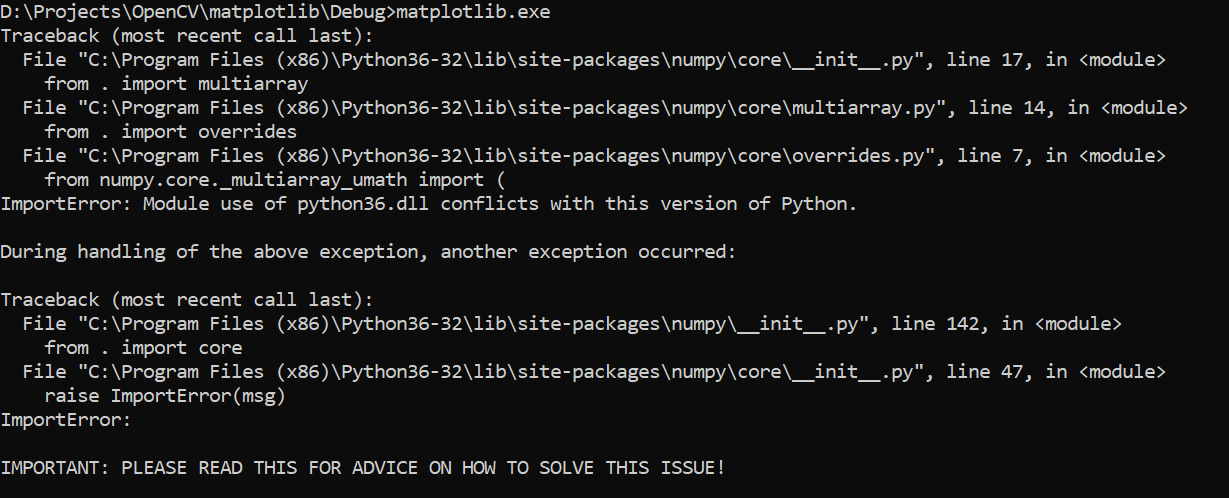
How the C++ library can make use of the Python matplotlib package is by using the Python compiled library (Python36.lib) and referencing the Python.h header file, which I got it from the Python installation path at C:\Program Files (x86)\Python3.6.3\libs. If the file you are an invalid lib file or dll file, most probably you will see the following error.
In order to get rid of this error, I built the application with 32-bit release version of python library.


I have to ensure that I have matplotlib installed for Python. Note that I have multiple versions of the Python installed in my PC and I need to install the matplotlib package just for Python3.6.3 because I am going to use that Python version in my C++ project. I used the following command to install the matplotlib package just for Python 3.6.3

C:\Program Files (x86)\Python3.6.3>python -m pip install matplotlib.

Basically I CD the Python installation path so that when i call the Python command it will call to the 3.6.3 version, as my default Python installation at that time was 3.7.3, which is not what i want to use in my C++ project.

Note: If you are using python.exe, that means the numpy and matplotlib packages need to be compatible with the "Release" version. If you are using python_d.exe then you need to ensure numpy and matplotlib is compatible with the "Debug" version. For debug version you can use C:\Program Files (x86)\Python3.6.3>python_d.exe -m pip install matplotlib to do correct package installation. Typical error one will get when the version is not compatible is ImportError: cannot import name 'multiarray'
A good guideline for using debug version of the Python with release version of matplotlib from within Visual C++ Numpy issue

The full source code for the release can be retrieved from GitHub https://github.com/leonwooster/matplotlib